Contents
A medical bill is one of the easiest documents to inflate. It arrives as a PDF or a phone photo, it lists codes and amounts only the provider can confirm, and it is often paid by someone who has never seen the clinic. Adding a line used to mean rebuilding the layout by hand, and careless forgers forgot to fix the total. An AI image editor now does both in one edit.
We wanted to see that edit for ourselves, and to show what Sightova's checks make of it.
The experiment
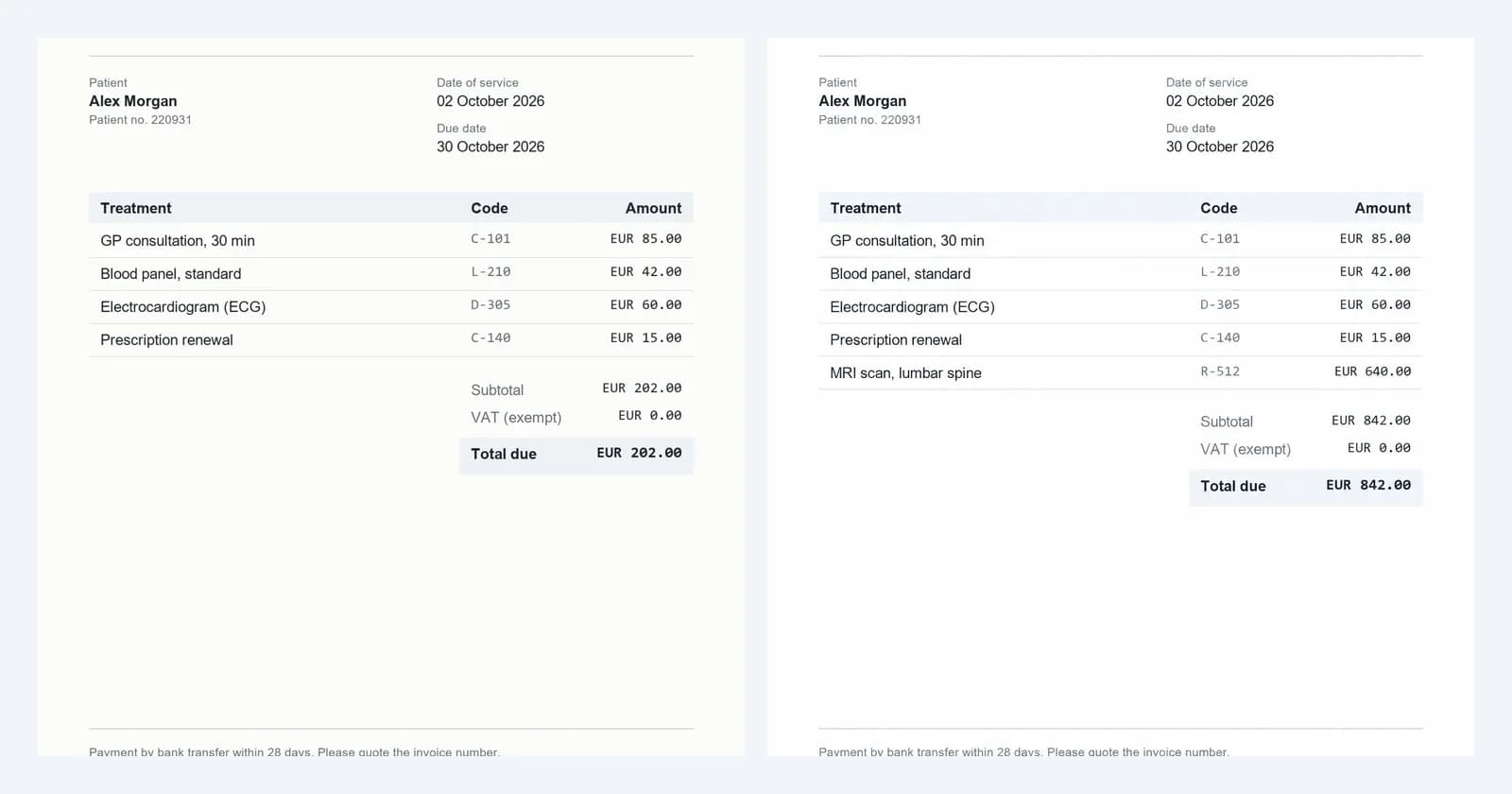
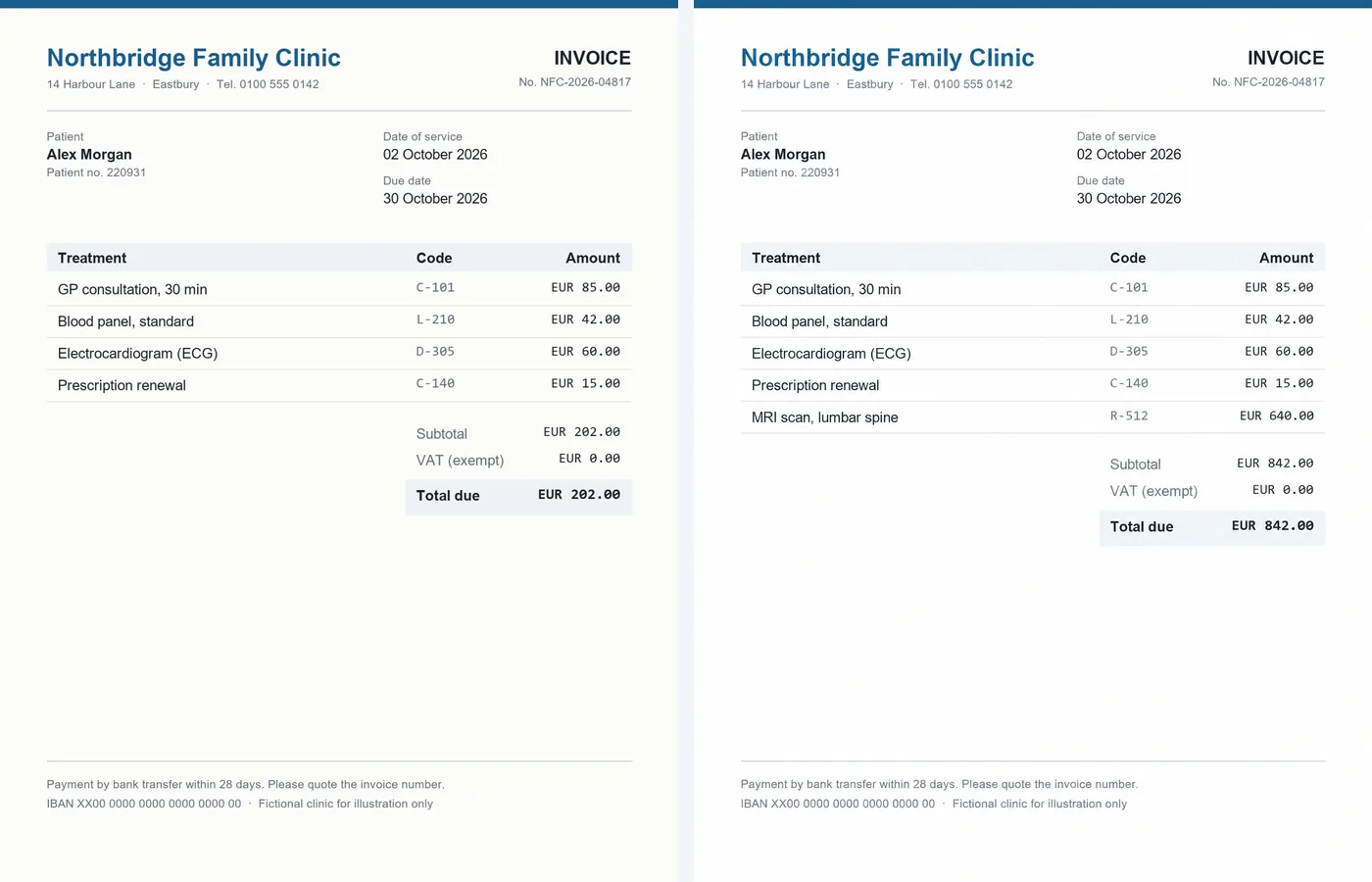
We started with a clean invoice that involves no AI at all. Sightova rendered it from scratch: a medical invoice from the Northbridge Family Clinic, with four treatment lines and a total of EUR 202.00. The clinic, its address and the patient are all fictional.
Then, on 15 October 2026, we edited that file with OpenAI's GPT-Image 2.5 through the OpenAI API. The edited copy has one extra line, "MRI scan, lumbar spine", code R-512, at EUR 640.00. The edit also changed both the subtotal and the total due to EUR 842.00, and kept the fonts, the column alignment and the spacing of the original.
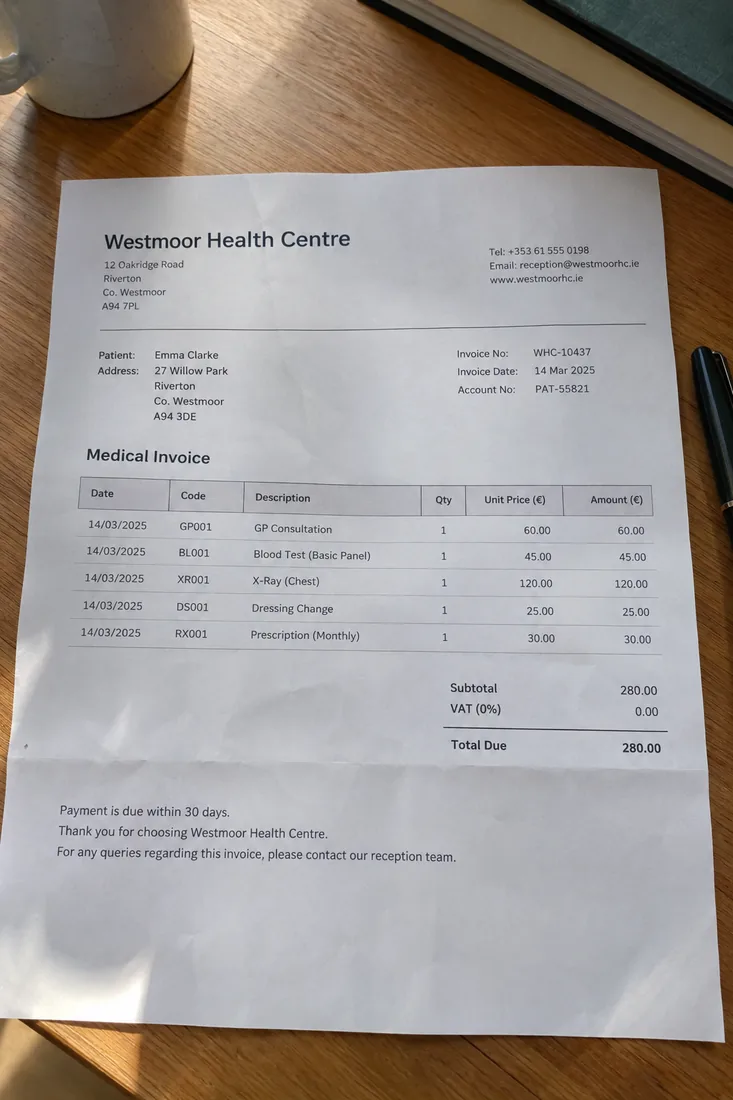
We also made a third file from a text prompt alone: a photo of a printed medical bill from a "Westmoor Health Centre", lying on a desk. That clinic and that bill don't exist either.
Why fixed totals are the dangerous edit
In our receipt forgery test, the edited receipt gave itself away in the arithmetic: the change no longer matched the total and the cash paid. A reviewer with a calculator could have caught it.
This invoice gives a reviewer nothing to calculate. EUR 202.00 plus EUR 640.00 is EUR 842.00, and that is exactly what the subtotal and the total say. The new line has a plausible description, a code in the same format as the others and an amount in the same style as the rest. Any check that only reads the numbers, whether it is a person or software that sums the lines, passes it.
That leaves two questions the maths can't answer. Did this treatment happen? And is this file the one the clinic issued? The first needs the provider. The second is what image and document checks are for.
What the scan returned
We scanned all three files the same day with the checks every Sightova AI image scan runs: the invisible watermark check (Google SynthID and OpenAI's watermark), content credentials (C2PA) and EXIF metadata, and our V3 synthetic-media model, which flags an image at 85% AI probability.
| Check | Original invoice | Inflated invoice | Generated bill photo |
|---|---|---|---|
| V3 AI probability | 2.14% | 94.51% | 93.64% |
| OpenAI invisible watermark | Not found | Found, 100% confidence | Found, 100% confidence |
| Content credentials (C2PA) | None | Valid, signed by OpenAI | Valid, signed by OpenAI |
| Result | Not flagged | AI Generated | AI Generated |
The original, which no AI touched, scored 2.14% with no watermark and no credentials. Both AI files were caught on all three signals: V3 scored both above the 85% line, and both carried OpenAI's watermark and signed credentials.
When a watermark or signed AI credentials are found, the dashboard's verdict is AI Generated even if the pixel model scores lower, because that evidence comes from the tool that made the file. Sightova's document tampering tool treats a found watermark the same way: the verdict reads AI-Generated Document.
What the checks can and can't see
These results are clean because OpenAI marks what its models make. Not every tool does, and that evidence is easy to lose:
- Watermarks and credentials only exist when the tool adds them. OpenAI and Google do. Most open-source editors add neither.
- Content credentials are fragile. A screenshot, a re-save or a trip through most messaging apps strips the C2PA manifest. That is why the pixel model runs on every scan.
- Small edits are the pixel model's hardest case. V3 scored both AI files high here, but small AI edits inside real photos are where any pixel model struggles most, and our testing methodology says so openly. One high score on one invoice is not a promise for every edit.
- Not every forgery uses AI. A line added in a PDF editor or a photo editor leaves no watermark and no generator traces. That is the job of Sightova's document forensics model, which scores a document for tampering and draws a heatmap of where it changed. In the receipt test it scored the real receipt at 2.8% forgery probability and the edited copy at 97.6%.
Three files are a demonstration, not a benchmark. On public benchmarks, V3 detected 97.35% of images from nine of the newest generators and wrongly flagged 0.24% of 61,999 real web images; the full results and their limits are on the testing methodology page.
Where to check
The one-added-line edit works on any bill that someone else pays:
- Healthcare billing and reimbursement. Patient-submitted medical bills, and claims with a procedure that never took place. See healthcare fraud detection.
- Insurance claims. Health and travel claims with medical bills attached, and repair invoices on property and motor claims. See insurance fraud detection.
- Accounts payable. A supplier invoice with one extra service line and a matching total looks like every other invoice in the queue. See enterprise.
- Expense claims. Receipts and invoices uploaded to expense tools. See fake receipt detection.
- Lending and onboarding. The same edit on a bank statement or a payslip. See banking fraud detection.
- Disputes and evidence. Invoices submitted in legal claims and audits. See legal and compliance.
The best place for the check is intake: when the claim, invoice or expense is submitted, before anyone approves a payment. One API call per file sends the suspicious ones to a reviewer.
When the evidence is weak
A found watermark is close to proof. A missing one proves nothing, and neither does a low score. When a bill matters and the file evidence is thin, ask for better evidence:
- The original PDF from the provider, not a photo, scan or screenshot of it, ideally sent by the provider directly or downloaded from its portal.
- Confirmation from the provider, using contact details you already hold rather than the ones printed on the invoice.
- The context around the line. A procedure that no referral, pre-authorization or earlier claim mentions is worth a question, however neat the total.
- A closer look at the file. A photo of a printed bill with no camera metadata, or a PDF that is really a single image, is a reason to look closer, not a verdict.
Treat every score as a reason to route a file, not as the decision itself.
Try it
Upload an invoice or a photo of a bill in the dashboard, or build the same checks into claims intake, accounts payable or expense tools with the API. To check a file only for Google's and OpenAI's invisible watermarks, use the free SynthID decoder.