Contents
Changing a number on a receipt used to take Photoshop skills, the right font and a steady hand. Today an AI image editor does it from a one-line instruction, and it matches the font, the paper texture and the camera blur for you. Document checks have become one of the fastest-growing uses of Sightova, so we wanted to show exactly what our document forensics model sees when it meets one of these edits.
The experiment
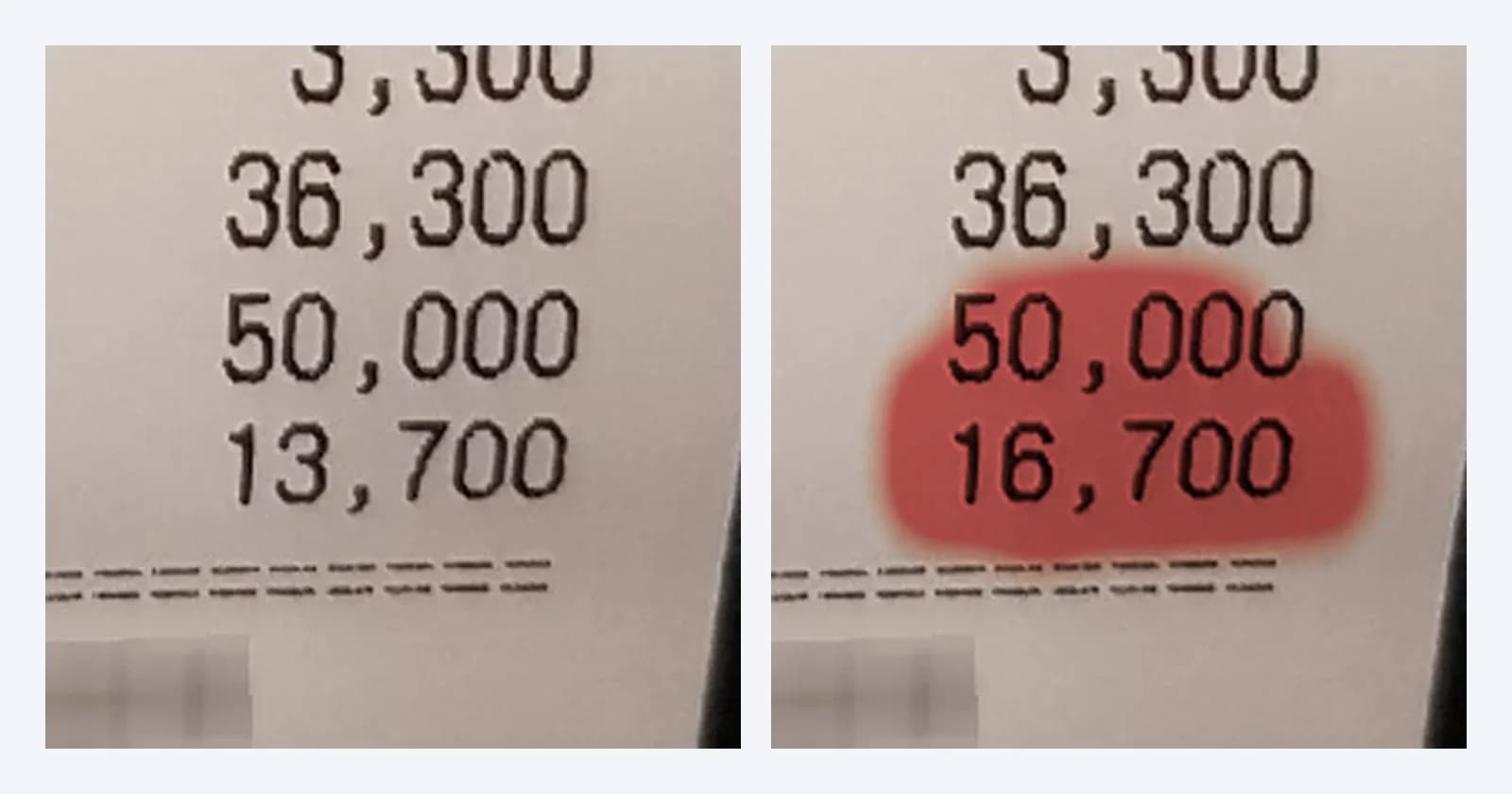
We took a real restaurant receipt from CORD v2, a public dataset of phone-photographed receipts (CC BY 4.0, with merchant details already blurred), and asked Qwen-Image-Edit, an open-source AI image editor, to change a single amount: the CHANGE line, from 13,700 to 16,700.
It took about ten seconds. The new digits use the same thermal-printer font, sit on the same paper grain and carry the same slight blur as the rest of the photo. On a phone screen, nothing gives it away.
Can a reviewer spot it?
Only if they do the maths. The receipt's total is 36,300 and the customer paid 50,000 in cash, so the change should be 13,700. The edited copy says 16,700.
That is the forger's mistake, not the editor's. A careful forger fixes the arithmetic as well, by changing the total or the cash line to match, and then there is nothing left for a reviewer to check. The pixels are the only evidence that remains.
What the scan returned
We ran both files, the original photo and the edited copy, through the same checks Sightova runs on every document:
| Check | Original photo | Edited copy |
|---|---|---|
| Invisible AI watermark (SynthID, OpenAI) | Not found | Not found |
| Content credentials (C2PA) | None | None |
| Forgery probability | 2.8% | 97.6% |
| Share of the image flagged | 0% | 0.9% |
| Strongest local signal | 0% | 99.96% |
Two things stand out. The watermark and credentials checks found nothing on either file: open-source editors don't add them, and re-saving a photo strips most metadata anyway. And the forensics model separated the two cleanly, 2.8% against 97.6%, while flagging less than 1% of the edited image.
Reading the heatmap
A probability tells you that something is wrong. The heatmap tells you where.
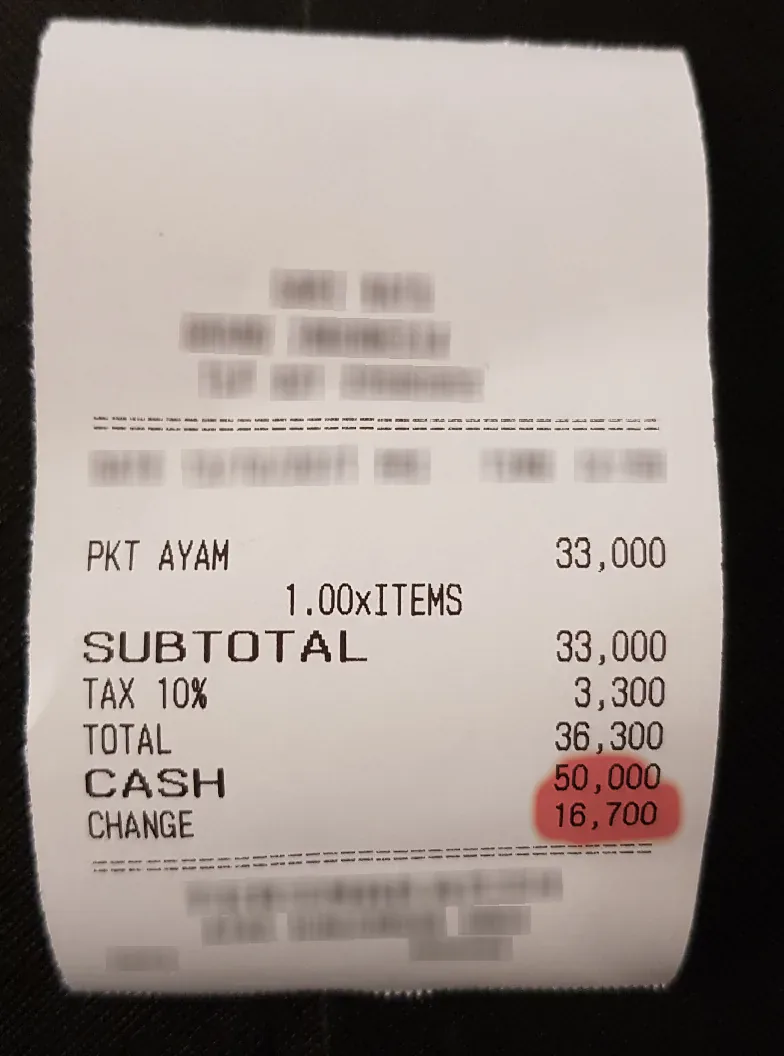
The model scores the document cell by cell on a fine grid. Here the heat sits on the rewritten amount and the line just above it, where the editor regenerated pixels, and the rest of the receipt stays clean. For a reviewer, that turns "this receipt might be fake" into "check this number against the card statement", which takes a minute instead of an investigation.
Why the watermark check still comes first
Not every fake receipt is an edit. Image generators can now produce whole receipts from a prompt. When that receipt came from Google's Gemini or OpenAI's GPT-Image models, it carries an invisible watermark, and Sightova reports it straight away: the verdict becomes AI-generated document, with the generator named. You can try the watermark check on its own with our free SynthID decoder.
The three checks cover different kinds of fake:
- Edited originals, like this one: caught by the pixel-level forensics model.
- Receipts generated from a prompt: caught by invisible watermarks when the generator adds one, and by the forensics model.
- Documents re-touched in an editor that writes Content Credentials: the edit is recorded in the C2PA manifest, and the heatmap shows where it happened.
Where this matters
Receipts are the easiest example, but the same edit works on any document that is photographed or scanned and then trusted:
- Expense claims: one changed total, every month. See fake receipt detection.
- Insurance claims: repair invoices and medical bills with an inflated line. See insurance fraud detection and healthcare fraud detection.
- Lending and onboarding: bank statements and payslips with a better balance. See alternative lending, banking and credit union fraud detection.
- Evidence and compliance: documents submitted in disputes. See legal and compliance.
What one example does and doesn't show
One receipt is a demonstration, not a benchmark. It shows what the output looks like and why the heatmap matters; it doesn't tell you how often the model catches edits across thousands of documents. For that, see the document forgery section of our testing methodology, which reports results on public benchmark sets, and its limitations.
Treat the forgery probability as evidence that sends a document to the right queue, not as a verdict on its own. The heatmap is what makes that review fast.
Try it
Document tampering checks are available on paid plans, in the dashboard and through the API:
POST /api/v1/detect/document-tampering?include_heatmap=true

{
  "tampering": {
    "is_tampered": true,
    "verdict": "tampered",
    "forged_probability": 0.9761,
    "tampered_percent": 0.9,
    "heatmap": [[0, 0, ...], ...]
  }
}
That is the response for the edited receipt, trimmed to the main fields. The full request format is in the API docs.