Rebuild trust in visual content.
Detect images generated or edited by AI and see the evidence behind the result: invisible watermarks, C2PA credentials and a heatmap of where to look. Connect it to your own workflow through the REST API.
What is AI Image Detection?
AI image detection analyzes digital images to reveal whether, and where, AI generation or manipulation has occurred.
The Sightova AI Image Detector makes this simple: get a probability and the evidence behind it in the dashboard, or through a REST API you connect to your own pipeline. To expose synthetic images, our engine examines:
- Image StructuresStructural inconsistency detection
- Compression PatternsCompression artifact analysis
- Pixel-Level AnomaliesGeneration trace detection

A Complete Forensic Breakdown
Upload an image and get AI detection, invisible watermark checks and content credentials in one scan. NSFW, violence and document tampering checks are ready when you need them.
Authenticity Detection
Find out in seconds whether an image was generated by AI or captured by a camera, with a probability score and a confidence value.
Closest Generator Style
See which generator style an AI image most resembles. When a watermark or C2PA credentials name the tool, Sightova shows you exactly which one.
Pixel Heatmap Analysis
See exactly where a photo looks AI-edited, with a heatmap overlay that shows reviewers where to look. Available on Starter and up.
NSFW Score
Score images for explicit content and hold uploads back before they go live. Run it in the dashboard or through the API.
Violence Score
Score images for violence and get a clear verdict, so you can pull violent images before your users see it.
Document Tampering
Flag edited regions in document images such as receipts, invoices and IDs, with a tampering verdict and a heatmap. Available on Starter and up.
More Than an AI-or-Human Label
Each Sightova result shows the AI probability, the watermark and content-credential evidence, and, on Starter and up, a heatmap of the regions that look AI-edited. We test on 250k+ benchmark images and 50+ generative models, and publish the results on our testing methodology page.
Why it is Important
Generative AI is advancing at an unprecedented rate, making photorealistic deepfakes, altered documentation, and fraudulent images nearly impossible to spot with the human eye.
User-friendly creation tools are widely available, enabling anyone to create convincing visuals. Sightova takes on the critical question, is this image original?, with a probability and the evidence behind it.
How it Works
When you submit an image, our AI model analyzes its pixels, and the same scan checks for invisible watermarks and reads C2PA credentials and metadata. On Starter and up, a heatmap highlights the regions that look altered or generated by AI.
The model is tested on images from leading generators such as Midjourney, OpenAI, Stable Diffusion and Google, and you can see how it performs on our testing methodology page.
Sightova Image Detector API
Run Sightova's checks from your own code. The REST API is included on every plan: grab an API key and you are up and running.
Pixel Heatmap
Starter and up get a heatmap of the regions that look edited, in the dashboard and from the document tampering endpoint, so reviewers see exactly where to look.
Results in Seconds
Send an image and get a full result back in seconds. Start free, then pick the plan that fits your monthly scan volume.
REST Integration
Send an image by upload, URL or base64 and get structured JSON back. Connect from your own backend or workflow, with the full API reference in our docs.
One API, Four Endpoints
AI image detection, NSFW, violence and document tampering through one API key, drawing from one credit balance.
Who Needs AI Image Detection?
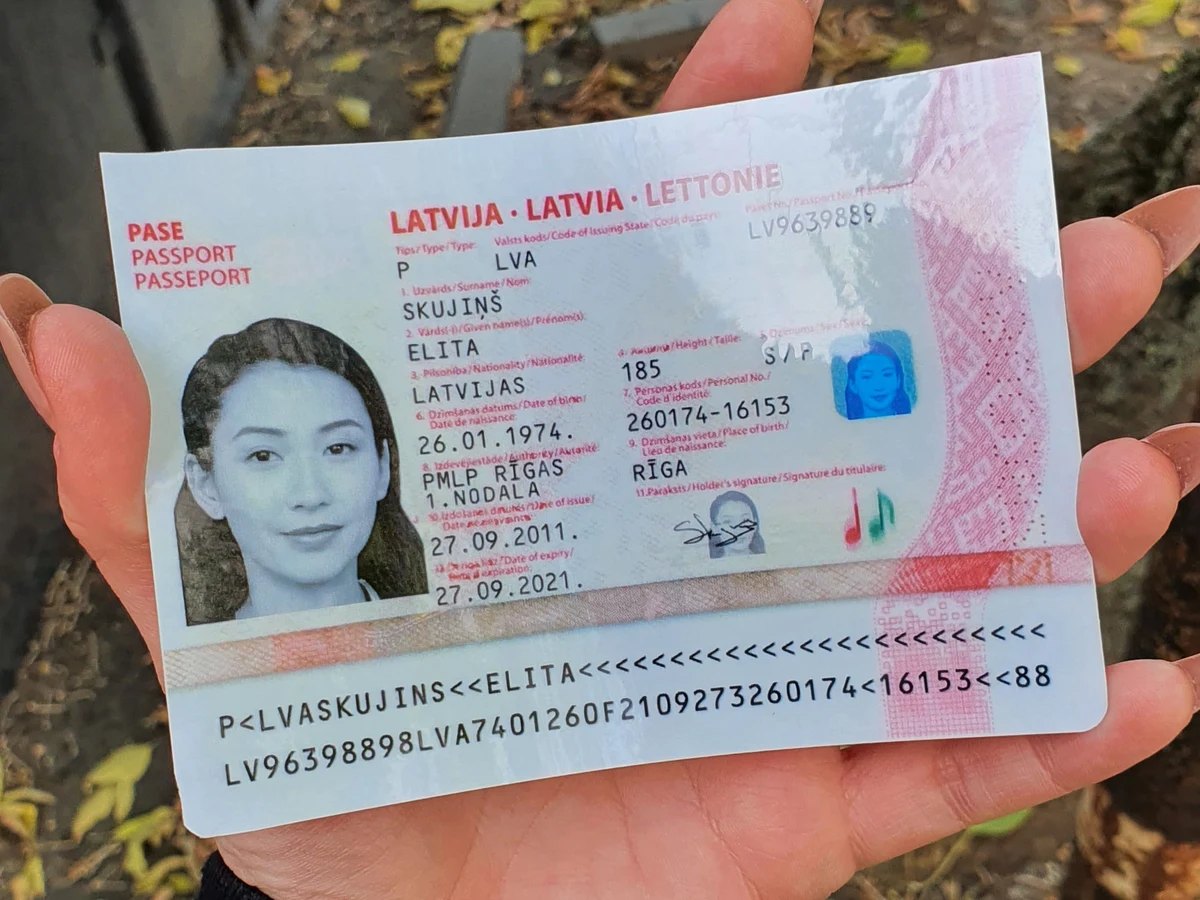
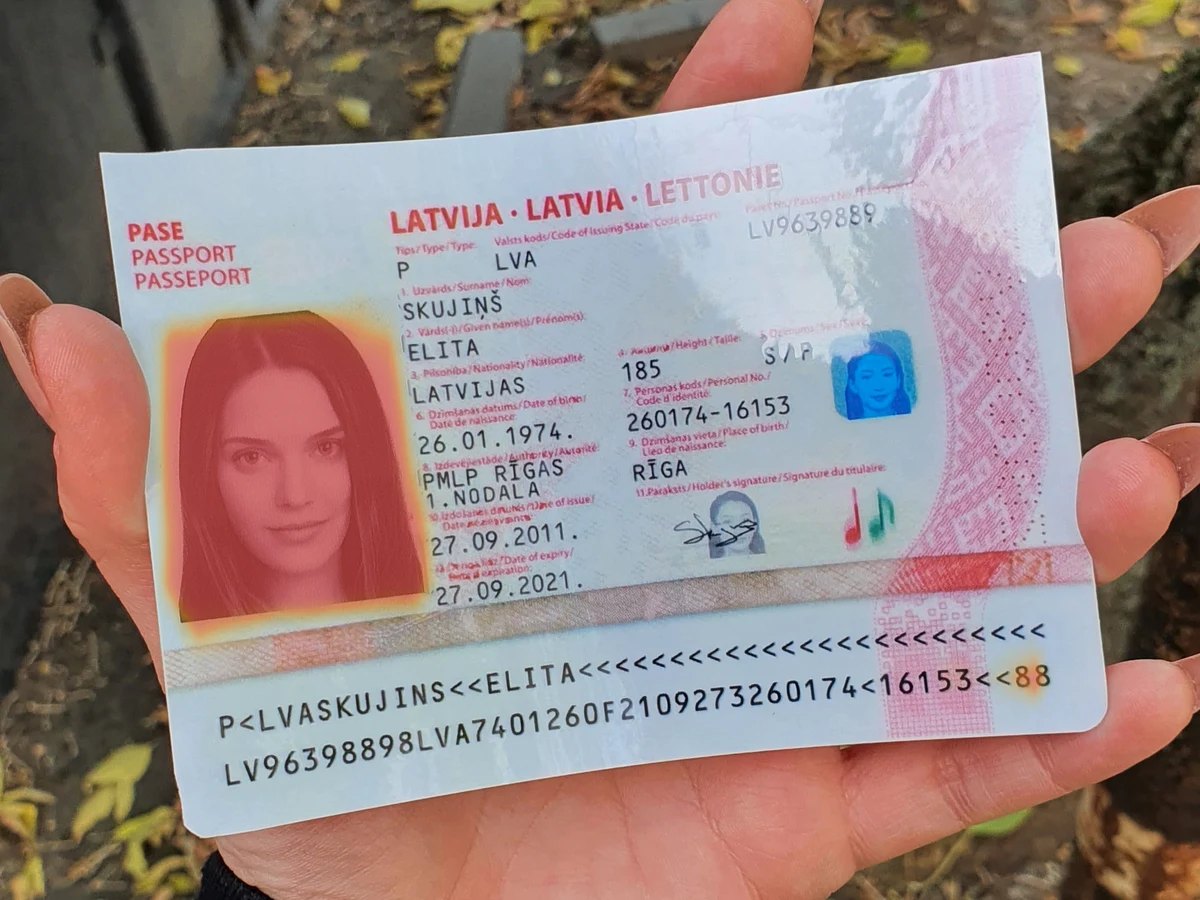
Passport from MIDV-DM by Smart Engines, based on MIDV-2020 (CC BY-SA 2.5): a mock document with invented details and a generated face, shared under the same licence. Highlight: Sightova's document heatmap for this edit.
AI Image Detector FAQs
Ready to authenticate your visual content?
Start free with no credit card, or get in touch to talk through your use case.
Get a Demo