Contents
A face swap takes a photo of one person and puts another person's face into it. The result says "this person was here" or "this person did this", when they were never there and never did it. Face swaps sit behind some of the most personal kinds of fraud and abuse online, so we wanted to show, step by step, what Sightova's deepfake detection sees when one arrives.
No real person involved
Most face-swap demonstrations use real people: a celebrity, a politician, a colleague. We didn't. Putting a real person's face into a photo without their consent is exactly the harm this post is about, and a demo is no excuse for it.
So both people in this experiment are synthetic. We generated two different men with OpenAI's GPT-Image 2.5 on 15 October 2026:
- Man A: grey hair, glasses, dark suit, an office headshot.
- Man B: dark hair, a beard, a navy T-shirt, sitting at a café table with a coffee.
Neither man exists. We then asked GPT-Image 2.5 to put A's face into B's café photo, so that it looks as if A spent the afternoon at that café. We are not publishing the prompt or any settings: this post is about catching swaps, not making them.
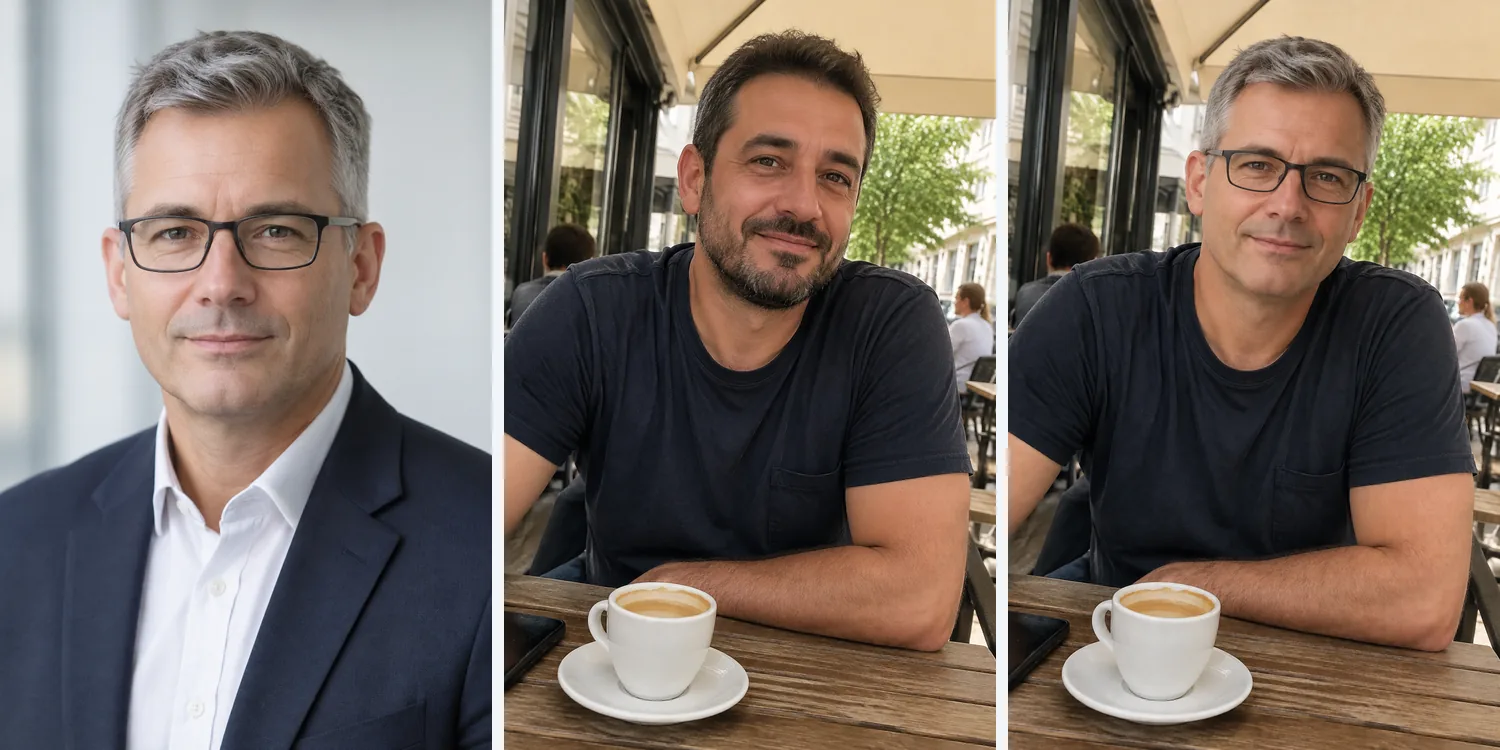
The swap is convincing at a glance. The pose, the T-shirt, the cup and the street come from B's photo; the face, glasses and grey hair come from A. Nothing in the picture says that two images went into it.
What the scan returned
We ran all three files, exactly as the generator returned them, through the same three checks every Sightova scan uses: the invisible watermark check (Google SynthID and OpenAI's watermark), content credentials (C2PA) and metadata, and our V3 model, in production since 11 October, which flags an image at 85% AI probability.
| Image | V3 AI probability | OpenAI watermark | Content credentials (C2PA) |
|---|---|---|---|
| Man A, headshot | 94.37% | Found, 100% | Valid, signed by OpenAI |
| Man B, café | 94.83% | Found, 100% | Valid, signed by OpenAI |
| Swap: A's face in B's café photo | 94.93% | Found, 100% | Valid, signed by OpenAI |
All three were flagged as AI-generated, on all three signals. In the dashboard each one comes back as AI Generated, with the reason "OpenAI signed this image and declared it AI-generated." and a Verified by C2PA badge.
That is the easy case: the files came straight from a commercial generator that watermarks and signs its output. The rest of this post is about what happens when those signals are missing.
Reading the heatmap
V3 also scores the image region by region and draws the result as a heatmap: green where it reads the image as clean, red where it reads it as generated or edited.
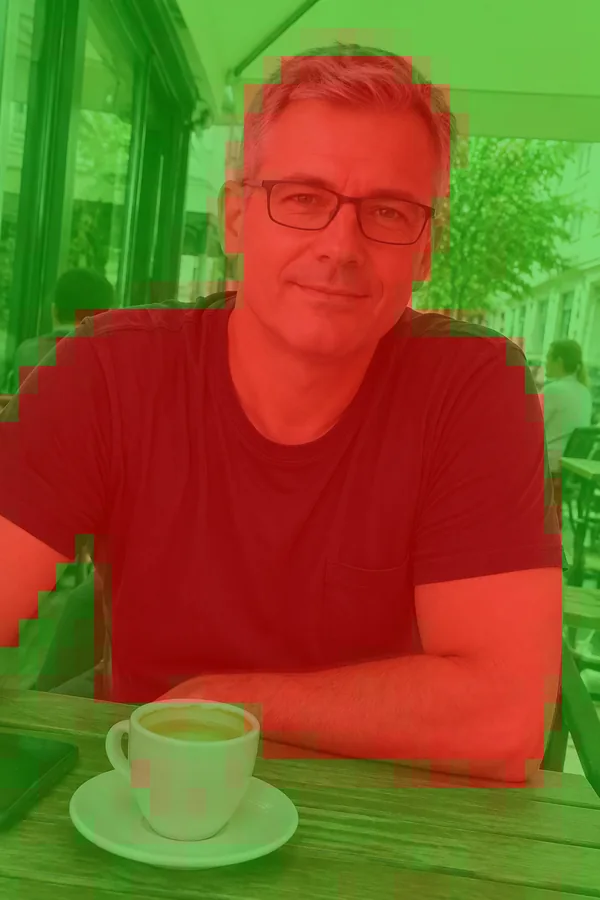
On the swapped image, 50.1% of the frame is flagged, with a peak of 99.4%, and the red is concentrated on the person.
An honest note on what this shows. You might expect only the face to light up, since that is what was swapped. It doesn't, because the café photo was itself generated: everything in it is AI output, not just the new face. So the heatmap marks the whole person and much of the scene, not the outline of the swap.
A swap onto a real photo is a different and harder case. There the model has to find a small generated region inside genuine camera pixels, which is the hardest job for any detector. Our testing methodology reports V3 on the standard face-swap benchmarks and is open that this is an area we are still improving.
How face swaps are misused
The technique is the same across very different harms:
- Fake endorsements. A known face placed into an ad, "recommending" a product or an investment.
- Romance scams. A fake profile that can produce "new" photos of the same face in new places, which makes the persona feel real.
- Impersonation. A colleague's or an executive's face on a profile picture or in a call, used to ask for money or access.
- Non-consensual imagery. A real person's face put onto intimate images. The person depicted is harmed whether or not anyone believes the image.
- ID selfie fraud. A selfie with a borrowed or invented face, submitted to match a stolen or forged ID at onboarding.
In every case the image claims that a person was somewhere or did something, so it is worth checking where it arrives, before anyone acts on it.
What each check can and can't tell you
Invisible watermarks are close to proof when they are found, and they name the source. OpenAI and Google add them to the images their models make. A watermark is built to survive re-saving and compression, but heavy edits can weaken it. We explain the check in watermark forensics, and you can run it for free with the SynthID decoder.
Content credentials are the most explicit evidence: a signed record that says the image was made with AI. They are also the most fragile. Screenshots, re-saving and most messaging and social apps strip them, so a swap that has been shared once usually arrives without any.
The V3 model reads the pixels themselves. Most open-source face swappers add neither a watermark nor credentials, so for their output, and for any file that has been stripped, the pixel model is the check that still has something to go on. On public benchmarks it detected 97.35% of images from nine of the newest generators and wrongly flagged 0.24% of 61,999 real web images (see the methodology). Small generated regions inside real photos are harder than fully generated images, as our results on AI edits show, and V3 will miss some of them.
That is why every scan runs all three. A missing watermark proves nothing on its own; a signed credential settles the question when it is there; and the pixel model covers the files that carry neither.
Where this matters
- Dating platforms: check profile photos, and photos sent in chat, before they build trust. See dating platform fraud detection.
- Social platforms: synthetic profiles and impersonation posts at scale. See social media.
- Onboarding and KYC: selfies and ID photos uploaded as files can go through the same scan. See banking fraud detection.
- Security teams: profile pictures and images used in impersonation and phishing attempts. See cybersecurity AI detection.
- Newsrooms: viral photos that put a public figure somewhere they never were. See journalism.
When a flagged image shows a real person, treat the result as evidence that sends it to the right review, together with what you know from elsewhere: was the image sent as an original file, does the account have a history, can the person be reached another way?
Try it
You can scan any image, including profile photos, in the dashboard, or build the same three checks into an upload flow with the API.
All three images in this post were generated by Sightova with GPT-Image 2.5 through the OpenAI API on 15 October 2026. Neither man exists, and no real person's face was used.