Contents
On 11 October we put a retrained V3 model into production, and since then we have seen a sharp rise in AI image checks on Sightova. The question we hear most is simple: does it catch the newest generators? So on 15 October we made a fresh batch of images with today's frontier models and ran them through the same checks every Sightova scan uses.
The test
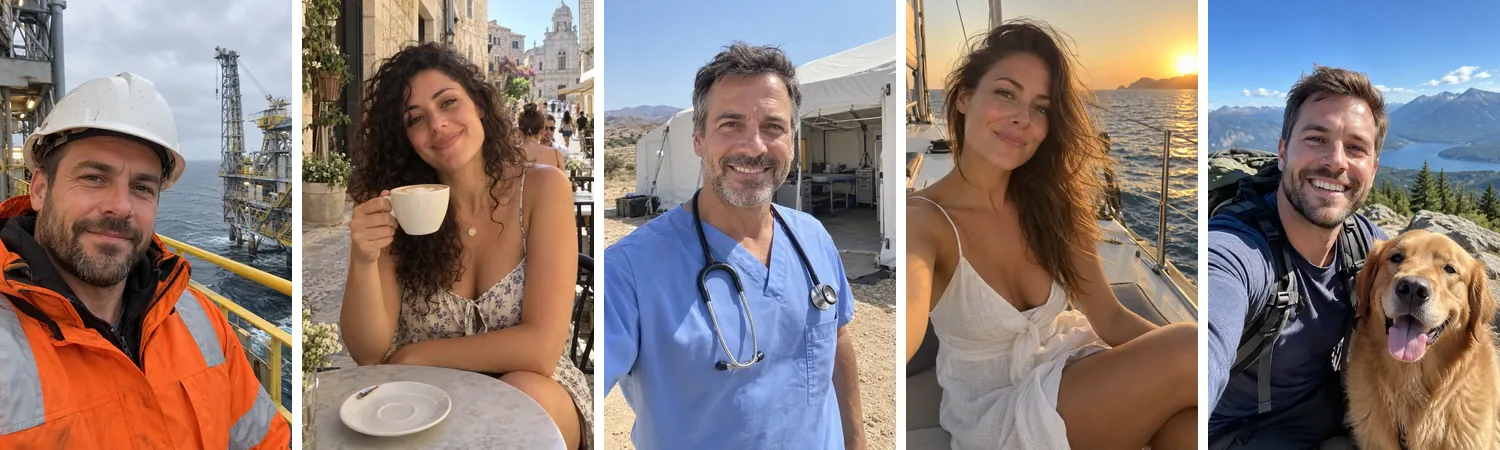
Thirteen images, all generated on 15 October 2026, after V3 shipped, so none of them can have been part of its training:
- GPT-Image 2.5 (OpenAI): five dating-profile portraits, the kind romance scammers use.
- Nano Banana Pro (Google): a house listing, a beach resort, beach volleyball, a yoga class and a wedding.
- Nano Banana 2 (Google): a handbag product shot, a swimmer and a baker.
Every prompt asked for an ordinary, photorealistic photo with no text or logos. We scored the original files exactly as the generators returned them.
The results
| Generator | Images | V3 AI probability | Invisible watermark | Content credentials |
|---|---|---|---|---|
| GPT-Image 2.5 | 5 | 94–96% | OpenAI, found in 5 of 5 | Signed by OpenAI, 5 of 5 |
| Nano Banana Pro | 5 | 94–95% | SynthID, found in 5 of 5 | Signed by Google, 5 of 5 |
| Nano Banana 2 | 3 | 94–95% | SynthID, found in 3 of 3 | Signed by Google, 3 of 3 |
All thirteen were flagged as AI-generated. Every V3 score cleared our 85% threshold, every image carried its maker's invisible watermark, and every file came with a valid C2PA manifest signed by its maker. The watermark decoder reported 100% confidence on the OpenAI images and between 79% and 99.8% on the Google ones.

Three signals, and why you want all of them
Each check answers the question in a different way, and each one can fail on its own:
- Invisible watermarks. Google (SynthID) and OpenAI hide a signal in the pixels of the images their models make. When it is there it is close to proof, and it names the source. Not every generator adds one, and open-source models usually don't. You can run this check on its own with our free SynthID decoder.
- Content credentials (C2PA). A signed manifest attached to the file that records how it was made. It is the most explicit evidence there is, and the most fragile: screenshots, re-saving and most social and messaging apps strip it.
- Sightova's V3 model. Reads the image itself for the traces that generation leaves, so it still has something to go on when there is no watermark or credential to find.
On fresh files like these, all three agree. Images in the wild usually arrive re-encoded and stripped of their metadata, and then the pixel model carries more of the weight. That is why we test it on its own, at scale, on public benchmarks.
The bigger picture
Thirteen images is a spot check, not a benchmark. Our testing methodology reports V3 on tens of thousands of images: it detected 97.35% of images from nine of the newest generators, including FLUX.2 max, Seedream 5 and Grok Imagine 2, while wrongly flagging 0.24% of 61,999 real web images. It is also open about what is still hard, such as small AI edits inside real photos; see the limitations.
What this means in practice
Images like these already show up wherever people decide whether to trust someone:
- Dating profiles. The five portraits above are classic romance-scam personas. See dating platform fraud detection.
- Email scams. Fake listings, prizes and product shots. See the email scam detector.
- News and public claims. Photos of events that never happened. See journalism and AI content authentication.
- Social platforms. Synthetic profiles and posts at scale. See social media and deepfake detection.
You can check any image yourself in the dashboard, or build the same checks into your product with the API.